


Designers actually use AI design tools for speed at the start of a project: generating moodboard directions, exploring concept variants, filling backgrounds and showing clients a rough preview before any real modelling begins. Used that way, ai interior design tools are assistants for exploration, not replacements for design judgement. This guide shows you exactly where they earn their place in a professional workflow, where they fail, and how to integrate them honestly.
Key takeaways
- AI tools are strongest in the first 20 percent of a project: moodboards, concept variants and quick client previews.
- They are weakest where precision matters: true scale, real materials and buildable joinery.
- The professional pattern is generate, select, then rebuild properly in your normal design tools.
- Adoption is rising fast: the 1stDibs 2026 designer survey reports designer use of AI tools roughly tripled year over year.
- Disclose AI-assisted imagery to clients early; it protects trust and sets correct expectations.
What are ai interior design tools actually good at?
They are good at producing plausible-looking interior imagery and variations very quickly from text prompts or reference photos. That speed is genuinely useful when a client cannot yet picture a direction, or when you need ten starting points instead of one. The output is a conversation starter, not a deliverable.
Think of the output as a sketch in a new medium. A pencil sketch does not specify joinery, and neither does an AI render. Both help you and your client decide what is worth developing. The mistake is skipping the development stage and presenting the sketch as the design.


The four realistic professional uses
- Build moodboards faster by generating atmospheric images that capture a palette, a light quality or a style direction.
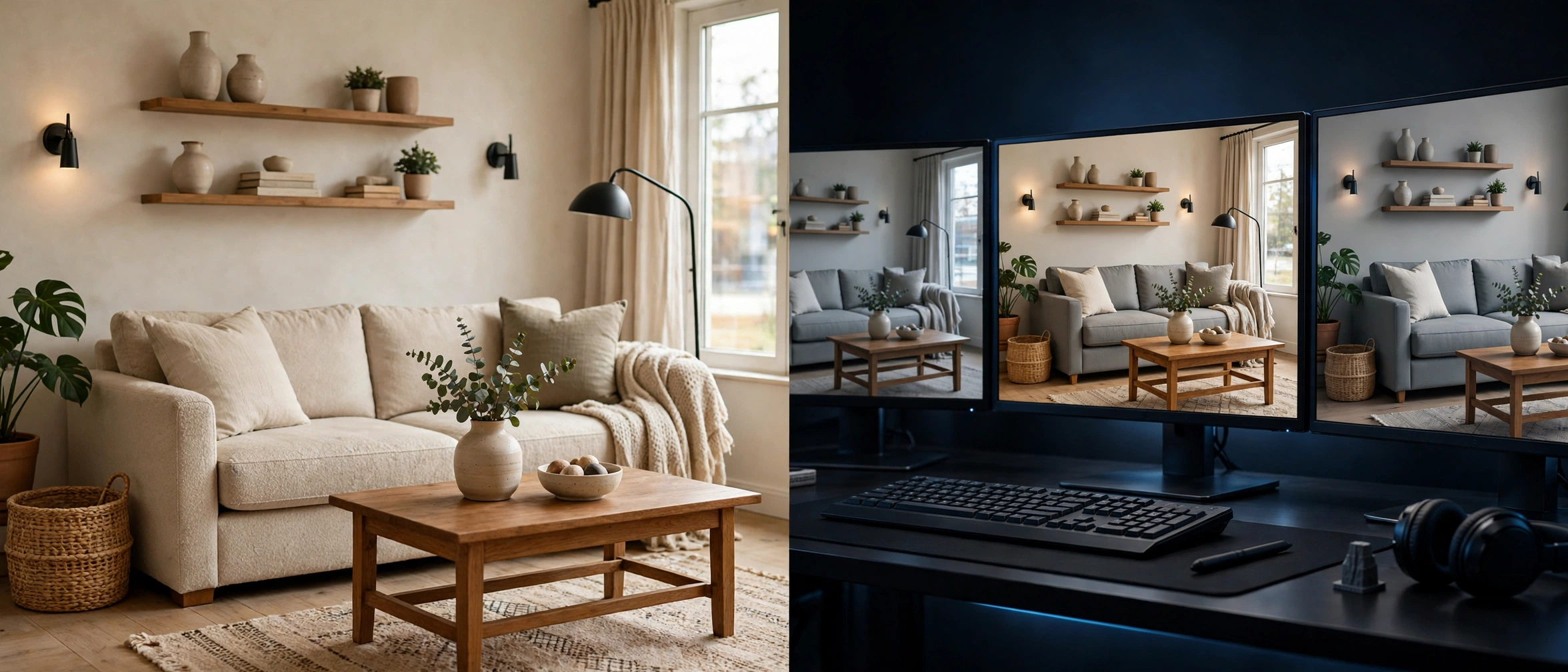
- Generate concept variants of the same room so a client can react to real alternatives instead of abstract descriptions.
- Create backgrounds and styling layers for renders, such as soft furnishings, plants and tabletop objects behind your real modelled furniture.
- Produce rough client previews early, clearly labelled as concepts, to unlock decisions before you invest modelling hours.
Each of these uses shares one trait: a human designer still makes the final decisions. You curate, you correct, and you take responsibility for what reaches the client.

How do you build a moodboard with AI without losing your style?
Start from your own references, not from a blank prompt. Feed the tool two or three images that already represent your taste, then ask for variations in palette or mood. This anchors the output in your style instead of the tool’s average of the internet.
Work in rounds. Generate a wide first round, pin the three directions that feel right, then narrow with more specific prompts about materials and light. Save the prompts that worked; a personal prompt library becomes a real studio asset over time.
A step-by-step moodboard workflow
- Collect five to ten reference images from your own past projects and saved inspiration.
- Write a prompt that names the room type, the style direction, the palette and the light you want.
- Generate a broad first batch and delete anything off-brief without hesitation.
- Refine the surviving directions with tighter prompts about materials and furniture silhouettes.
- Assemble the final board in your usual presentation tool, mixing AI images with real product and material references.
- Label which images are AI concepts so the client never mistakes them for purchasable products.
Mixing real references into the board matters. A board that is one hundred percent generated imagery floats free of budgets, suppliers and reality. A board anchored by real pieces stays buildable.
Where do AI tools hit their limits?
They fail precisely where furniture and interiors become physical: scale, materials and construction. An AI image can show a beautiful cabinet whose drawers could never open, in a room whose proportions quietly change between images. Understanding these limits is what separates professional use from expensive disappointment.
Scale and proportion drift
Generated rooms rarely hold consistent dimensions. A sofa that looks two metres long in one image may read as two and a half metres in the next variant. Never measure from an AI image, and never let a client fall in love with a proportion you cannot reproduce.
Materials that do not exist
AI invents surfaces freely: wood grain that matches no species, stone veining no quarry produces, fabrics no mill weaves. Treat every generated material as a mood, then substitute a real, orderable material during development.
Joinery and construction are invisible
A generated image shows the outside of furniture only. It cannot tell you how a corner is joined, whether a span will sag, or how a mechanism works. Construction still comes from your design tools, your workshop knowledge and your prototyping.
| Task | AI tool strength | Still needs a designer for |
|---|---|---|
| Moodboard imagery | Excellent: fast, atmospheric, varied | Curation and anchoring to real products |
| Concept variants | Strong: many directions in minutes | Choosing the direction worth developing |
| Backgrounds and styling | Strong: fills scenes convincingly | Keeping focus on the real designed pieces |
| Client preview | Useful early, with clear labelling | Managing expectations about the final result |
| Scaled design | Weak: proportions drift between images | All measuring, modelling and documentation |
| Materials specification | Weak: invents non-existent surfaces | Substituting real, orderable materials |
| Joinery and construction | None: shows surfaces only | Engineering, prototyping and testing |
How do you integrate AI into a real design workflow?
Place AI at the front of the workflow and keep your established tools in charge of everything after concept approval. The handover point is the key decision: once a direction is chosen, you rebuild it properly at true scale in your modelling software. Nothing generated should flow directly into production documents.
For style direction and client communication, study how established interiors organise their ideas; our tour of interior design examples and the styles behind them is a useful reference for naming the directions you ask AI to explore. Precise language about style produces far better prompts.
The generate-select-rebuild workflow
- Brief the project as you normally would: measurements, constraints, budget, client taste.
- Generate moodboard imagery and concept variants with AI tools.
- Select one direction with the client and record what exactly was approved.
- Rebuild the chosen direction at true scale in your regular design software.
- Replace every invented material and product with a real specification.
- Present the developed design, noting where it deliberately differs from the concept imagery.
This workflow keeps the speed and loses the risk. Clients get the excitement of early visuals; you keep control of everything that will actually be built.
Should you tell clients you used AI?
Yes, briefly and without drama, at the moment you first show generated imagery. A single sentence — “these are AI-assisted concept images to explore direction; the developed design will be modelled properly” — protects you legally, ethically and commercially. Clients who discover it later feel deceived; clients told early rarely object.
Disclosure also manages expectations. A client who knows an image is a concept understands why the final room differs in detail. A client who believes it is a photograph of their future room will hold you to every invented cushion.
The market context supports openness: according to the designer survey published by 1stDibs, professional adoption of AI tools roughly tripled in a single year, so clients increasingly expect these tools in a modern studio. Using them is normal; hiding them is the risk.
How much time do AI tools actually save — and where do they cost it?
They save hours in the first week of a project and can cost days later if their output is trusted too far. A moodboard that once took an afternoon of searching, cropping and arranging now takes an hour of prompting and curation. Concept variants that once meant re-rendering a scene overnight now arrive before lunch.
The hidden cost appears at the handover. Every invented detail in an approved concept becomes a question you must answer during development: what is that material, how is that shelf supported, where does that product come from? Studios that log this honestly find the net saving is real but modest — unless the rebuild is disciplined.
Keep the saving, cut the cost
- Cap concept generation at a fixed number of rounds and record the deadline in the project plan.
- Annotate approved concepts immediately, marking what is real, what is approximate and what is pure mood.
- Carry those annotations into your prototyping stage so nothing invented slips through unexamined; our prototyping tools and workflow guide shows how to structure that checking stage.
- Review one finished project and compare concept promises against the built result to calibrate your next brief.
Treated this way, AI becomes what good tools have always been: a faster first draft, inside a process that still ends with human verification.
Common mistakes
- Presenting AI images as final designs. The proportions, materials and details will not survive contact with reality, and neither will client trust.
- Measuring or ordering from generated imagery. Dimensions drift between variants; always rebuild at true scale before committing money.
- Letting the tool choose your style. Unanchored prompts return the internet’s average taste. Feed your own references and curate hard.
- Skipping the rebuild. Sending concept imagery straight toward production documents imports every hidden impossibility into your project.
- Hiding AI use from clients. Disclosure takes one sentence early and saves a painful conversation later.
- Generating endlessly. Variant number forty is rarely better than variant number six. Set a selection deadline and move into real design.
Frequently asked questions
Will AI tools replace interior designers?
No evidence suggests that. They automate image production at the concept stage, but clients still need someone accountable for scale, materials, construction and budget. The designer’s role shifts toward curation and verification, not disappearance.
Can I use AI images in my portfolio?
Only with honest labelling. Presenting generated imagery as completed project photography misleads future clients and can damage your reputation when discovered. Label concepts as concepts, and show the built result beside them when you have one.
How accurate are AI room proportions?
Not accurate enough to design from. Proportions drift between generations of the same room, and objects change size relative to each other. Use the imagery for mood and direction only, then model at true scale.
Do AI tools know real furniture products?
They imitate the look of products without reliable knowledge of dimensions, availability or price. Anything you intend to specify must be checked against a real catalogue and substituted into the design during development.
What is the best first AI task for a small studio?
Moodboards. They are low-risk, visibly impressive to clients and easy to control. Master anchored prompting and ruthless curation there before using AI imagery anywhere near client previews.
Keep learning: AI handles the concept stage; the production stage still belongs to dedicated software — compare your options in our guide to the best 3D furniture design software.
Conclusion
AI design tools earn their place at the front of your workflow: moodboards, concept variants, backgrounds and clearly labelled previews. They fail at scale, materials and joinery, which is exactly where your professional value lives. Generate widely, select honestly, rebuild properly, and tell your client what they are looking at.
Your next step: pick one current project and run the generate-select-rebuild workflow on its moodboard stage only, then compare the time saved against your usual process. Which stage of your projects do you think AI will genuinely change first — and which will you never hand over?




 English
 العربية
 Français